How often, when you need info on a command, do you get "Here is the cheat sheet" as an answer? That is not always the suitable way to learn.
Learning means understanding the very kernel inside a specific matter, not just reading instructions. Let's take an example from Linux:
ls : directory listing
If you need just and exactly directory listing, it is ok. But it is hardy ever the case. The power of cheat sheets is better exploited to look for a basic function (see later) or to remember some common function we have already used quite often.
On the other hand, a cheat sheet, as detailed as it could be, cannot answer all the questions arising when an intermediate user is looking for a specific function: what is the order of the listing? Does it contain the last modification time? Who created the files?
How to learn and solve a problem in Linux
The best process is:
- to write down (yes, write on a piece of paper) the exact function you need
- if you do not know the command, google the function you need or look for it in a cheat sheet
- once you know the command, man it
- look for all the keywords related to the exact function in the manual
It may seem tedious at first: it is. But it will save a lot of time, A LOT, whenever you need a slightly different function to be performed by the same command, because you are learning its kernel, not just reading instructions.
An example
Let's take the introduced ls as an example and apply the process:
- to list files in a specific directory, showing the most recently accessed, not just modified, ones at the end with their last access time
- look for "list" in a cheat sheet and you get ls as the basic command to use
- man ls opens the manual page for ls
- look for the "time" or "access time" keywords
Under --time option you read that -u relates to access time, -u with -lt sorts and shows access time. But you are not done yet, as you could see by trying the ls -ult command, because the order is reversed with respect to what you wrote down in 1. So you need to look for the "reverse" keyword and you get that -r is needed: ls -ultr.
But you have not just found the solution to your original problem, you now know that you can sort by time, access or modification, and that you can reverse the listing order independently: you learnt how ls works, not just got an answer to one of the infinite possible tasks related to directory listing.
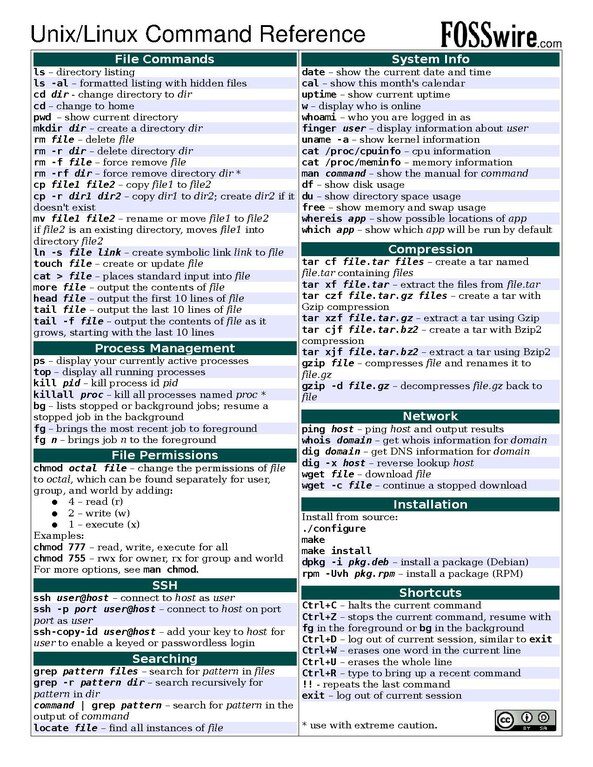 |
| Source: https://commons.wikimedia.org/wiki/File:Unix_command_cheatsheet.pdf A pdf version is available at the link, useful for text searching. |


Nessun commento:
Posta un commento